What Is Microsoft Excel and What Is It Used For?
What Is Microsoft Excel and What Is It Used For?
Microsoft Excel is one of the most popular computer programs in the world. It is used in offices, schools, businesses, banks, shops, hospitals, and even at home.
But if you have never used Excel before, it can look confusing at first. You may see many boxes, letters, numbers, tabs, and buttons. The good news is that Excel is easier to understand when you learn it step by step.
In simple terms, Microsoft Excel is a program used to organize information, calculate numbers, create reports, and analyze data.
It is like a digital notebook, calculator, table, and reporting tool all in one place.
What Is Microsoft Excel?
Microsoft Excel is a spreadsheet program created by Microsoft. A spreadsheet is a digital document made up of rows and columns.
The small boxes you see in Excel are called cells. You can type words, numbers, dates, formulas, and other information inside these cells.
For example, you can use Excel to list:
- Names of students
- Monthly expenses
- Sales records
- Product stock
- Employee attendance
- Customer contacts
- Exam marks
- Business income
- Project tasks
Excel helps you keep this information organized and easy to read.
What Does Excel Look Like?
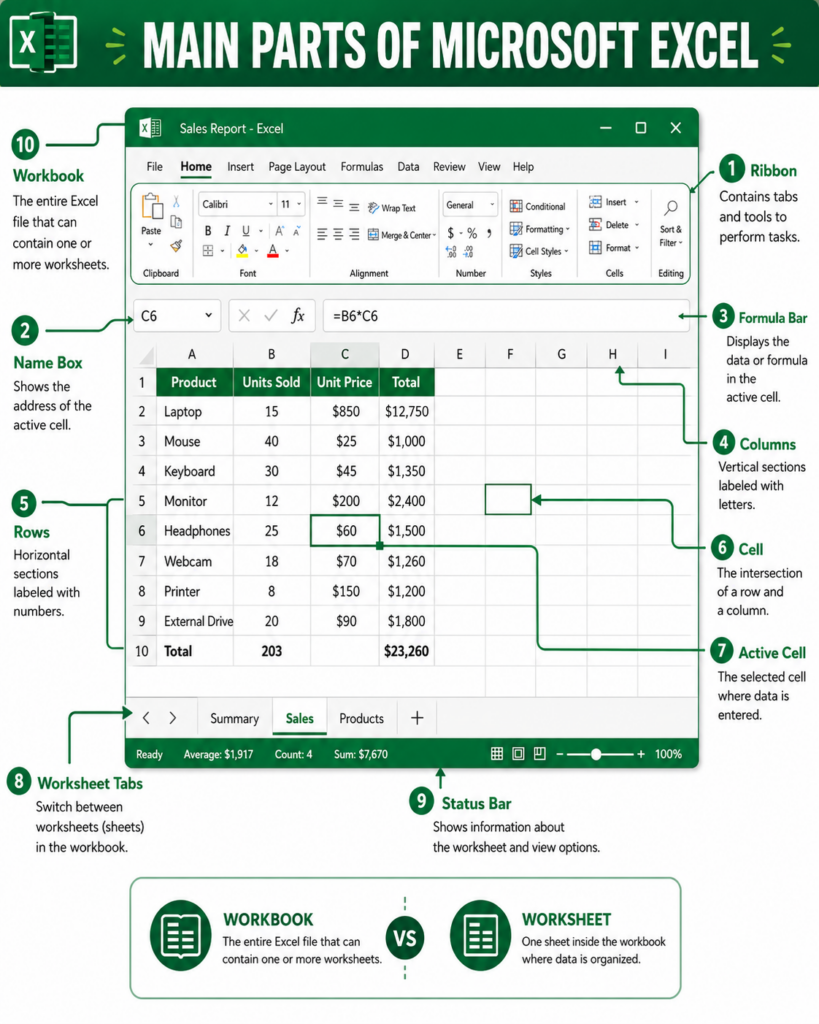
When you open Excel, you usually see a large grid. This grid is made up of:
Rows
Rows go from left to right. They are numbered 1, 2, 3, 4, and so on.
Columns
Columns go from top to bottom. They are labelled A, B, C, D, and so on.
Cells
A cell is one box inside the spreadsheet. Each cell has a name based on its column and row. For example, the first cell is called A1 because it is in column A and row 1.
Worksheet
A worksheet is one page inside Excel.
Workbook
A workbook is the full Excel file. It can contain one or many worksheets.
Think of a workbook like a book, and worksheets like pages inside that book.
What Is Microsoft Excel Used For?
Microsoft Excel can be used for many things. Some people use it for simple lists, while others use it for advanced business reports.
Here are the most common uses of Microsoft Excel.
1. Organizing Information
One of the easiest ways to use Excel is to organize information in a table.
For example, a small business owner can create a list of customers with columns such as:
- Customer name
- Phone number
- Email address
- Location
- Amount paid
- Payment status
Instead of writing this information on paper, Excel keeps everything neat and easy to update.
You can also sort the information alphabetically, filter it, or search for a specific name quickly.
2. Doing Calculations
Excel is very useful for calculations.
Instead of using a calculator manually, you can enter a formula and Excel will calculate the answer for you.
For example, if you want to add numbers from cell A1 to A5, you can use:
=SUM(A1:A5)
Excel will automatically add the numbers.
You can use Excel to calculate:
- Totals
- Averages
- Profits
- Losses
- Discounts
- Percentages
- Taxes
- Salaries
- Commissions
This makes Excel very helpful in business, accounting, schoolwork, and personal finance.
3. Creating Budgets
Excel is commonly used to create budgets.
A budget helps you track how much money you receive and how much money you spend.
For example, you can create a personal monthly budget with columns like:
- Income
- Rent
- Food
- Transport
- Internet
- Savings
- Other expenses
Excel can then calculate your total expenses and show how much money is left.
This is useful for individuals, families, businesses, churches, schools, and organizations.
4. Tracking Sales and Business Records
Many businesses use Excel to track sales.
A sales tracker can include:
- Date of sale
- Product sold
- Quantity
- Price
- Total amount
- Customer name
- Payment method
With this information, a business owner can know which products are selling, how much money came in, and which customers still need to pay.
Even small shops can use Excel before they move to more advanced business software.
5. Managing Inventory
Inventory means the products or items a business has in stock.
Excel can help businesses track:
- Products available
- Quantity bought
- Quantity sold
- Remaining stock
- Supplier details
- Reorder levels
For example, if a shop sells shoes, Excel can help track how many pairs are available, which sizes are running out, and when to restock.
This helps prevent losses and poor planning.
6. Creating Reports
Excel is also used to create reports.
A report is a summary of information that helps people understand what is happening.
For example, a company can use Excel to create:
- Sales reports
- Expense reports
- Attendance reports
- Performance reports
- Stock reports
- Project reports
Excel makes reports easier to read because you can arrange data clearly, use colors, apply formulas, and create charts.
7. Creating Charts and Graphs
Sometimes numbers are hard to understand when they are only shown in a table.
Excel allows you to turn numbers into charts.
For example, you can create:
- Bar charts
- Line charts
- Pie charts
- Column charts
Charts help people understand data faster.
For example, instead of reading a long list of monthly sales, a chart can quickly show which month had the highest sales.
8. Analyzing Data
Excel can help you study data and find useful meaning from it.
For example, if you have a list of sales, Excel can help you answer questions like:
- Which product sold the most?
- Which month had the highest sales?
- Which customer spent the most money?
- What is the average sale amount?
- Which items are not selling well?
This is called data analysis.
You do not need to be an expert to start analyzing data in Excel. Simple tools like sorting, filtering, formulas, and charts can already help you understand your information better.
9. Keeping Attendance Records
Schools, churches, offices, and organizations can use Excel to track attendance.
An attendance sheet can include:
- Name
- Date
- Present
- Absent
- Late
- Total attendance
Excel can also count how many times someone was present or absent.
This is useful for teachers, managers, trainers, event organizers, and team leaders.
10. Planning Tasks and Projects
Excel can also be used as a simple project planning tool.
You can create a task list with columns like:
- Task name
- Person responsible
- Start date
- Due date
- Status
- Comments
This helps teams know what needs to be done, who is responsible, and what has already been completed.
For small projects, Excel can be a simple and effective planning tool.
Why Is Excel Important?
Excel is important because many jobs and businesses use it every day.
Knowing Excel can help you:
- Work faster
- Organize information better
- Avoid calculation mistakes
- Create better reports
- Understand data
- Make better decisions
- Improve your job opportunities
Even basic Excel skills can be very useful.
For example, being able to create a table, use simple formulas, sort data, filter records, and create charts can already help you in many workplaces.
Who Uses Microsoft Excel?
Excel is used by many different people, including:
- Students
- Teachers
- Accountants
- Business owners
- Data analysts
- Office administrators
- Sales teams
- Human resource officers
- Project managers
- Shop owners
- Freelancers
- Researchers
This shows that Excel is not only for accountants or data experts. It is useful for almost everyone who works with information.
Is Microsoft Excel Hard to Learn?
Excel can look difficult at first, but beginners do not need to learn everything at once.
You can start with simple things like:
- Typing data into cells
- Creating a table
- Formatting text
- Adding numbers
- Saving a file
- Sorting a list
- Creating a simple chart
After that, you can slowly learn formulas, functions, reports, and data analysis.
The best way to learn Excel is by practicing with real examples.
For example, you can start by creating your own monthly budget or a simple list of items you want to track.
Examples of Simple Excel Projects for Beginners
If you are new to Excel, here are simple projects you can try:
Personal Budget
Create a list of your income and expenses. Use Excel to calculate how much you spend and how much you save.
Shopping List
Create a list of items you want to buy, their prices, and the total cost.
Student Marks Sheet
Create a table for student names, marks, total score, average score, and pass or fail status.
Sales Tracker
Create a simple table to track product sales, quantity, price, and total sales.
Attendance Sheet
Create a sheet to record who was present or absent on different days.
These projects are simple, but they can teach you the most important Excel skills.
Can You Use Excel Without the Internet?
Yes, you can use Microsoft Excel without the internet if it is installed on your computer.
However, internet access may be needed for:
- Installing Excel
- Activating Microsoft 365
- Saving files to OneDrive
- Sharing files online
- Collaborating with other people
- Using some cloud features
But for basic typing, calculations, formatting, and working on saved files, Excel can work offline.
Is Excel Only for Numbers?
No. Excel is not only for numbers.
You can also use Excel for text, names, dates, lists, schedules, notes, and planning.
For example, you can use Excel to create:
- A contact list
- A school timetable
- A project plan
- A cleaning schedule
- A content calendar
- A customer database
- A simple checklist
This makes Excel useful even when you are not doing calculations.
Excel vs Word: What Is the Difference?
Microsoft Word is mainly used for writing documents, letters, reports, and articles.
Microsoft Excel is mainly used for tables, numbers, calculations, lists, and data.
Use Word when you want to write a document.
Use Excel when you want to organize data, calculate numbers, or create tables and reports.
Excel vs Google Sheets: What Is the Difference?
Excel and Google Sheets are both spreadsheet tools.
Excel is made by Microsoft. Google Sheets is made by Google.
Google Sheets works mainly online and is very good for real-time collaboration.
Excel is very powerful and is widely used in businesses, offices, and professional data work.
Both tools are useful, and learning Excel makes it easier to understand Google Sheets too.